
Item Values
Check loot prices from your game screen.
Look up an item as you sort your stash. StashScanner shows a price estimate beside your cursor or in a panel you can keep on screen.
Hover, Shift-click or open Inspect.
Compare the item’s estimated value with the space it takes up.
Windows setup & requirementsA price estimate where you need it.
Item Values reads the visible game screen. Hover over an item, Shift-click it or open its Inspect window to look it up. You can use the cursor overlay for a quick check, or leave the detailed pinned panel in a convenient spot.
The estimate uses the 24-hour flea price when one is available. Otherwise, it uses the best trader estimate. The panel can show the trader comparison and rubles per slot alongside the item’s total value.
That gives you two useful ways to judge your loot: what the whole item may be worth, and how much value you get from each slot in your stash or bag.
Prices are estimates. The amount you can actually sell an item for may be different.
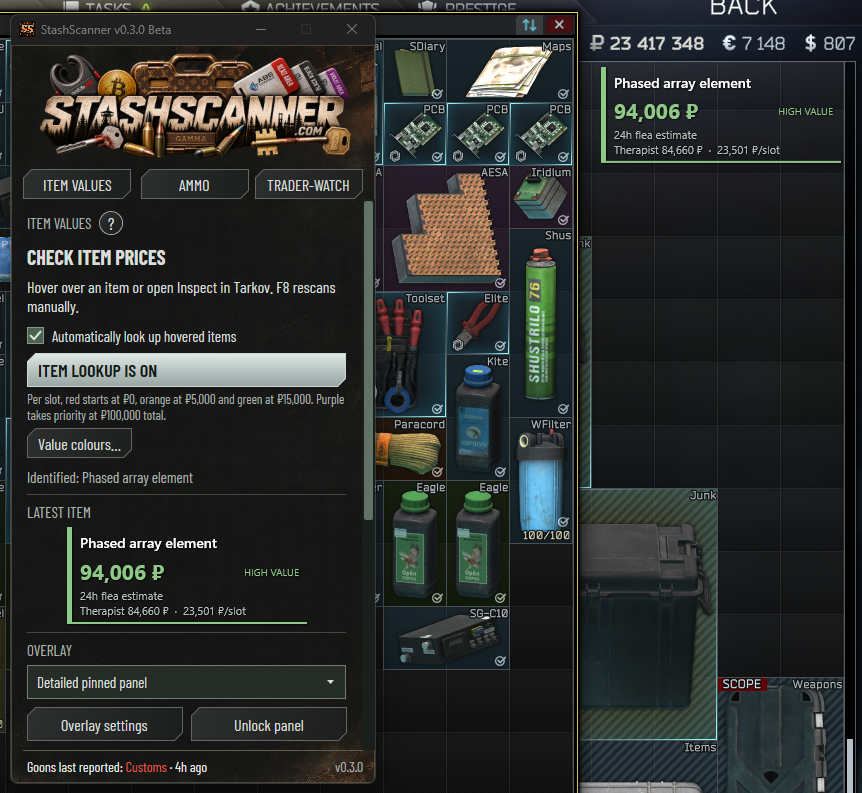
Set the value colours yourself.
Your thresholds decide which items stand out.
Value per slot
Set red, orange and green thresholds in rubles per slot. Use these to compare items of different sizes without treating a large item’s total value as the whole story.
Total item value
Set a separate purple threshold for the whole item. Purple takes priority when that total-value threshold is reached, so an expensive item can stand out even when its per-slot value is lower.
Keep the overlay comfortable to use.
Choose what suits your screen.
Cursor or pinned panel
Adjust opacity, text size, display duration and animation. Move the pinned panel where you want it, then lock it in place so it stays there while you sort your items.
Need help with a lookup?
Open the ? button inside Item Values for instructions. If an item is identified incorrectly, use Save scans for support and review the exported screenshots and logs before sharing them.
Get help with Item ValuesGet StashScanner for Windows.
v0.3.0 Beta · Free · Windows x64 · Unsigned beta
Requires .NET 10 Desktop Runtime x64. Setup & requirements
Independently developed. Community supported.
StashScanner is free to use. Ask a question on Discord, or support development on Patreon or Buy Me a Coffee.